
How to Trigger Events from Forms
We recommend using the Visual Tagger to track form submissions. It is the simplest option for most forms.
If it doesn't work, or your form setup needs a more custom implementation, you can use CSS class tracking instead.
Track a Form Using the Visual Tagger
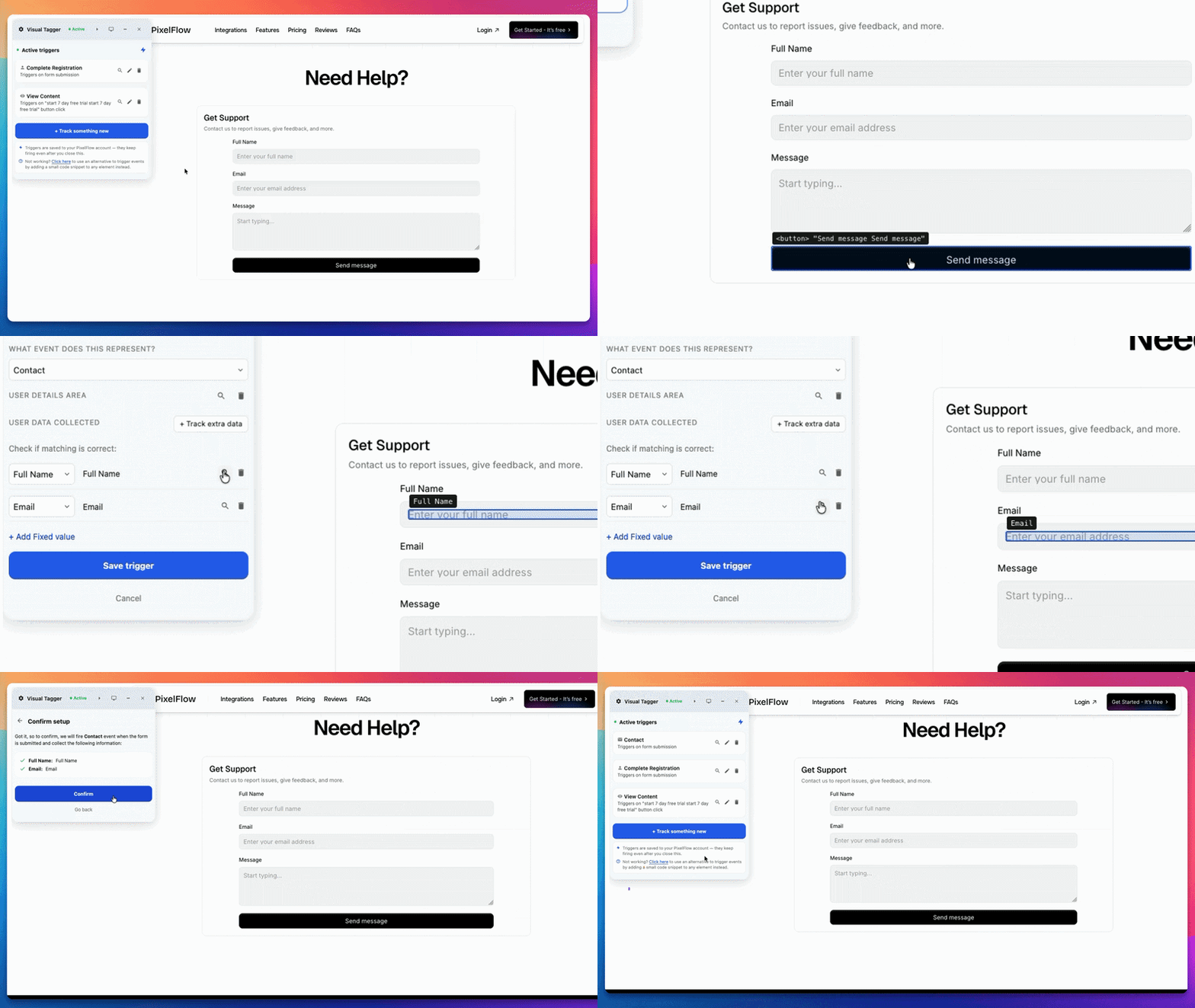
.Launch the Visual tagger by clicking Track More Events in the top right of your dashboard.
Select Via Visual Tagger and click Next. Your website will open with the Visual Tagger widget loaded.
Click Track Something New in the widget and select the element, button, or form you want to track.
Select "When the Element is Clicked" and then click the submit button on the form.
Note: the event triggers only after a successful submission.
Choose the event type from the dropdown.
Visual Tagger will automatically find form fields to track, such as name and email. Check the matches before saving.
If a field is missing, click Track extra data and select the extra field or area, such as phone number or another visible value.
Review the Confirm Setup screen and click Confirm.
Track a Form Submission using URL Trigger
URL triggers will trigger an event when a particular page is loaded on your website. In the case of triggering events from forms, you can use a URL trigger if the form redirects users to a unique success page after submission. For example:
User fills out a form on
yoursite.com/contactUser clicks submit
User is redirected to
yoursite.com/thank-you
In that case, you can use How to Trigger Events on Specific Page URLs to track the thank-you page.
If the form lives on the page, opens in a popup, or does not redirect to a unique success page, do not rely on Event URLs.
When to use manual tagging with CSS classes
Manual tagging is the secondary option. It takes more setup, but it gives you more control and stronger enrichment. Use it when you need to:
track custom form components with exact control
handle a setup where Visual Tagger is not enough
Manual tagging with CSS classes is the stronger option when data quality matters most, especially for lead forms where you want better match quality in Meta.
Why manual tagging can be stronger
When you add CSS classes to your form, PixelFlow can capture the actual submission and extract user data from the form fields. That gives you:
more accurate form tracking
better event match quality
more reliable attribution and optimization in Meta
Learn more in How to Track and Trigger Events using "Classes".
Use the right method for your form
Scenario | Best option |
|---|---|
Standard no-code form on the page | Visual Tagger |
Popup or modal form | Visual Tagger |
Form redirects to a unique thank-you page | Event URL tracking |
Need name, email, phone, or value from the form | Manual tagging with CSS classes |
Need more control over how the event fires | Manual tagging with CSS classes |
What to do next
Start with How to Track Events for the main setup path
Use How to Trigger Events on Specific Page URLs if your form ends on a thank-you page
Use How to Track and Trigger Events using "Classes" if you need stronger manual control
Use How to Test and Verify Your PixelFlow CAPI Setup to confirm your form event is working