
Add extra sites to your plan
You can buy extra site slots for $10 per site per month directly from your Subscriptions page without upgrading to a higher plan tier.
How to add extra sites
Go to Dashboard → Subscriptions.
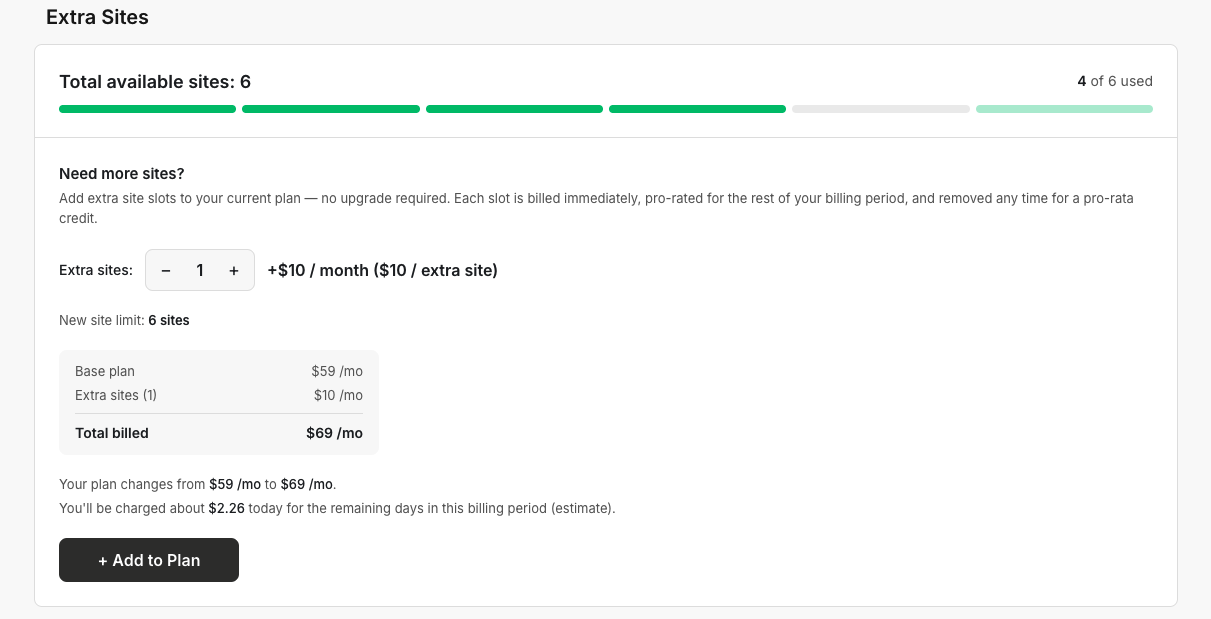
In the Extra Sites card, use the stepper to choose how many extra site slots you need.
Review the cost summary. It shows your base plan plus the extra site total.
Click + Add to Plan (or Update Plan if you are changing an existing number).
Confirm the change.
The extra slots are added immediately to your account.
How extra site billing works
Each extra site slot is billed immediately and prorated for the rest of your current billing period. If you remove extra sites later, you receive a pro-rata credit.
You can add up to 30 extra sites on top of your plan. If the stepper is disabled, check that your subscription is active and not scheduled to cancel. Extra sites are not available while a plan is inactive or paused.
When to use extra sites vs. upgrading
Extra sites are best when you need just one or two additional sites beyond your current plan limit.
Upgrading is more cost-effective if you need many more sites. PixelFlow plans include 1 site (Standard), 5 sites (Growth), or 10 sites (Agency).