Using the PixelFlow Playground
The PixelFlow Playground is a live demo environment where you can explore how PixelFlow tracks events before implementing it on your own site. Visit playground.pixelflow.so to test event tracking in real-time.
What You Can Do
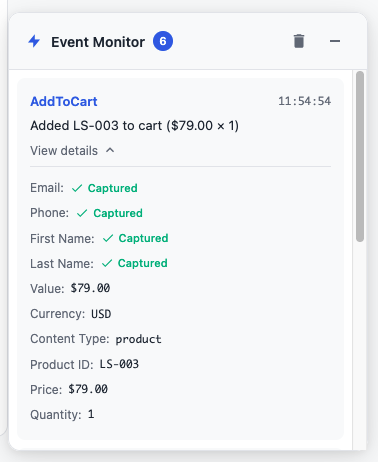
The playground lets you interact with buttons, forms, and other elements to see exactly what data PixelFlow captures. Each interaction triggers an event that appears instantly in the Event Monitor, showing the complete payload sent to Meta.
Every demo page includes the HTML structure and CSS classes used for tracking, so you can reference them when setting up your own site.
The Event Monitor displays events in real-time, including all parameters like customer data, product details, and timestamps—exactly as they're sent to Meta.
Testing Your Own Script
You can test your own PixelFlow tracking script in the playground. Replace the default script with your pixel ID to verify your configuration before deploying to production.
This is useful for:
Verifying your pixel ID is working correctly
Checking event parameters and data enrichment
Understanding how element classes trigger specific events
Debugging issues before they reach your live site
Next Steps
Once you understand how events work in the playground, see How to Test and Verify Your PixelFlow CAPI Setup to implement tracking on your own website.
For production testing, use Meta Test Events Mode to verify events without affecting your ad data.